A New Version of VMware NSX

A New Version of VMware NSX
Last week, a new release of VMware NSX has been released with the version 4.2.

SDDC in pocket – virtualization, cloud, networking, storage, devops, cloudops
VMware technologies
A New Version of VMware NSX
Last week, a new release of VMware NSX has been released with the version 4.2.
vSAN Networking – Network Oversubscription
It is not unusual for a virtualization administrator to request little more than connectivity to a certain number of network ports and perhaps some VLANs in their Top-of-Rack (ToR) network switches. Knowing what is beyond your up-stream ToR switches is essential in your ability to provide a […]
Join this session to learn how VCF makes it easy to run modern and traditional workloads side by side and enables cloud admin teams and platform teams to collaborate so much better. This is a part 2 deep dive.
We’re pleased to officially launch VMware Cloud Foundation usage meter v9.0 (VCF usage meter), previously branded as VMware vCloud Usage Meter, available from May 7, 2025. VCF Usage Meter overview VCF usage meter is a virtual appliance deployed on a vCenter Server instance within a VMware […]
After several months, attempts, and VCF rebuilds to get BGP peering with VMware Cloud Foundation, NSX, and my Ubiquiti Unifi network, it finally happened. I wanted to share my experience. This required a lot of help from internal rock star TAMs in our organization, external blogs, […]
If you’re managing VMware environments, you might occasionally run into persistent shell warning alerts in your ESXi hosts. Thankfully, you can quickly find and suppress these warnings with a bit of PowerCLI magic.
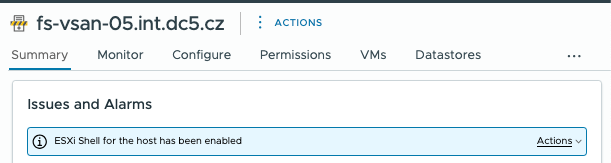
Show the actual advanced settings on all hosts. Log into vCenter using PowerCLI and run this command:
Get-VMHost | Get-AdvancedSetting | Where-Object { $_.type -eq 'VMHost' -and $_.name -eq 'UserVars.SuppressShellWarning' } | Format-Table entity, name, valueCommand output:
Entity                Name                          Value
------                ----                          -----
...
fs-vsan-04.int.dc5.cz UserVars.SuppressShellWarning     1
fs-vsan-05.int.dc5.cz UserVars.SuppressShellWarning     0
...
Check which ESXi hosts haven’t suppressed the shell warning (default). Then run the following command:
Get-VMHost | Get-AdvancedSetting | Where-Object { $_.type -eq 'VMHost' -and $_.name -eq 'UserVars.SuppressShellWarning' -and $_.value -ne 1 } | Format-Table entity, name, valueThis command outputs a table listing all hosts where the shell warning hasn’t been suppressed—it remains visible in the GUI.
Command output:
Entity                Name                          Value
------                ----                          -----
fs-vsan-05.int.dc5.cz UserVars.SuppressShellWarning 0Now, to suppress the shell warnings on selected ESXi hosts, run this simple command:
$esxi="fs-vsan-05.int.dc5.cz"
Get-VMHost $esxi| Get-AdvancedSetting | Where-Object { $_.type -eq 'VMHost' -and $_.name -eq 'UserVars.SuppressShellWarning' -and $_.value -ne 1 } | Set-AdvancedSetting -Value 1 -Confirm:$false | Format-Table entity, name, value
This command immediately disables the shell warnings on selected hosts. No more alerts in GUI!
Command output:
Entity                Name                          Value
------                ----                          -----
fs-vsan-05.int.dc5.cz UserVars.SuppressShellWarning 1It’s important to note that suppressing shell warnings is only advisable in lab or non-production environments. In production environments, shell warnings provide valuable security reminders. Always keep shell warnings enabled to maintain security awareness unless you’re working in a controlled test environment.
Happy scripting!
Learn about the power of automating your home lab with Ansible, Terraform, and CI/CD pipelines with your Git repository
The GMKtec NucBox has been growing in popularity amongst the VMware community as a modern AMD Ryzen-based alternative to the Intel/ASUS NUC, offering many of the same advantages while avoiding some of the drawbacks of Intel’s Hybrid CPU architecture. In preparation for my upcoming session at […]
Looking for your Home Lab Licenses to run either vSphere Standard Edition or VCF? This article should give you what you need to know to make this happen. VCP-VCF with VMUG Advantage now ready to unlock vSphere Standard Edition or VCF!
Looking for your Home Lab Licenses to run either vSphere Standard Edition or VCF? This article should give you what you need to know to make this happen. VCP-VCF with VMUG Advantage now ready to unlock vSphere Standard Edition or VCF!
TPM is an industry-wide standard for secure cryptoprocessors. Since vSphere 6.7 VMware has supported TPM v2.0 A Trusted Platform Module (TPM) is a specialized microcontroller designed to secure hardware through integrated cryptographic keys. It is embedded […]


