I built sso-users—a lightweight Go application that connects directly to the VMware Directory Service (vmdir) over LDAPS and reports local SSO users together with their password expiration status.
The project was originally created for VMware Cloud Foundation (VCF) 9 environments, but it should works anywhere the vCenter SSO directory is available over LDAP.
When performing security reviews or compliance audits, one of the recurring questions is:
Which local SSO accounts exist?
Are any passwords already expired?
Which accounts never expire?
Are any accounts disabled or locked?
Some of the questions can be answered by PowerCLI and the VMware.vSphere.SsoAdmin module. But not all. I wanted something that:
runs anywhere
has zero PowerShell dependencies
is easy to automate
can be integrated into monitoring systems
exposes the data over a simple REST API
So I wrote sso-users in Go.
What It Does
The application connects securely to vmdir using LDAPS and retrieves local SSO accounts.
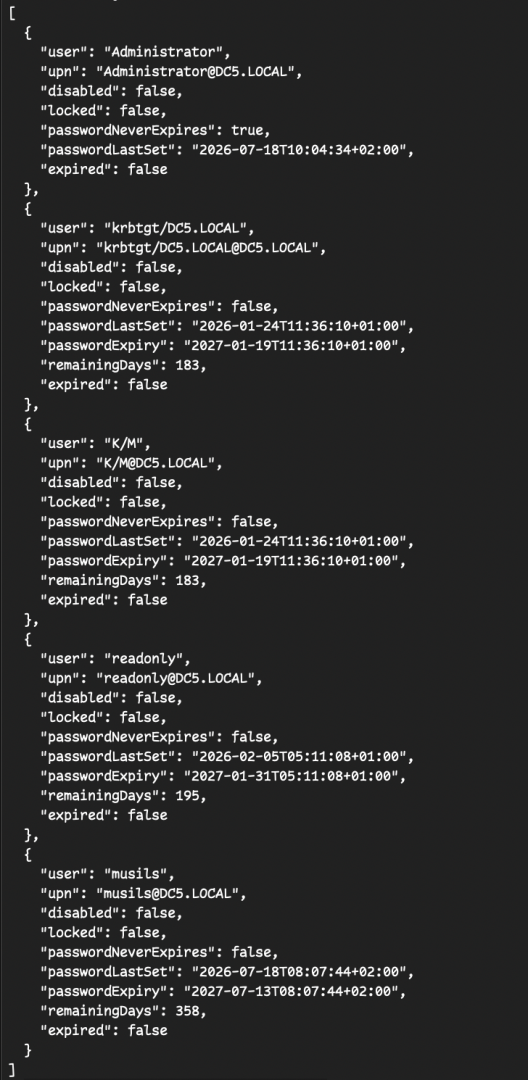
For every user it calculates password expiration based on the directory attributes and displays information including:
Username
User Principal Name (UPN)
Disabled state
Locked state
Password never expires
Password last changed
Password expiration date (if is not set to password never expire)
Days remaining until expiration (if is not set to password never expire)
Instead of relying on the vSphere UI, the tool reads the information directly from LDAP, making it fast and script-friendly. (GitHub)
Flexible Output
The CLI supports multiple output formats depending on your workflow.
For administrators:
Human-readable table output
For automation:
JSON output
This makes it easy to integrate with:
monitoring systems
scheduled compliance reports
inventory scripts
CI/CD pipelines
Built-in REST API
Besides the CLI, sso-users can also run as a small HTTP service.
The API is protected with a bearer token and exposes:
/health
/api/v1/users
This makes it straightforward to integrate with dashboards, Grafana, custom portals, or other internal tooling without repeatedly invoking the CLI. (GitHub)
Security First
Security was one of the design goals.
The application:
supports interactive password prompts
can read credentials from environment variables
avoids logging passwords or API keys
supports trusted TLS certificates
allows -insecure only for internal or lab environments with self-signed certificates
It also avoids placing passwords in shell history whenever possible. (GitHub)
Why Go?
Go is a great fit for infrastructure tools.
The resulting binary is:
cross-platform
fast
easy to distribute
dependency-free
Release builds are available for:
Linux (amd64)
Windows (amd64)
macOS (Apple Silicon)
Open Source
The project is completely open source, and I hope it becomes useful for VMware administrators, consultants, and anyone responsible for auditing vCenter environments.
Feedback, bug reports, feature requests, and pull requests are always welcome.
The VCF Download Tool is a handy CLI that makes grabbing and managing VMware Cloud Foundation (VCF) bits a breeze. You’ll get commands to download, upload, list, and clean up binaries and metadata for your VCF releases, plus easy setup, teardown, and running of the Update Manager Download Service (UMDS). In short, it’s your one-stop utility for getting VCF artifacts ready and keeping them in shape.
Where to start
Prepare correct download token which belongs to Site ID in Broadcom portal, where is valid VCF licences. Otherwise it fails to download. Save the token to txt file in your home directory for example “downloadtoken.txt”. I am doing all the commands on linux machine. For windows follow official KB https://knowledge.broadcom.com/external/article/401373/vcf-download-tool-under-windows-os.html which will guide how to install WSL (Windows subsystem for Linux) and you can continue with next step.
Download & Extract the VCF Download tool
I created directory in my home folder called “vcfd” ( “mkdir ~/vcfd“. Then I download the VCF Download tool “vcf-download-tool-9.0.0.0.24703747.tar.gz” from broadcom.com website into the “vcfd” folder. Also I moved my “downloadtoken.txt” into the “/data” folder “mv ~/downloadtoken.txt /data“
Extract the tar.gz file
Go to the “vcfd” directory with command “cd ~/vcf” and extract the vcf-download-tool-9.0.0.0.24703747.tar.gz archive.
tar -xf vcf-download-tool-9.0.0.0.24703747.tar.gz
VCF Downlaod Tool CLI usage
to get basic help just run the command “vcf-download-tool” without parameters or with “-h” or “–help”.
./vcf-download-tool -h
*********Welcome to VMware Cloud Foundation Download Tool***********

Version: 9.0.0.0.24703747
Usage:
vcf-download-tool [-hv] [COMMAND]

Description:
The VCF Download Tool is a command-line interface (CLI) utility designed to simplify the management of binaries and metadata for VMware Cloud Foundation (VCF) environments. It provides a suite of
commands for downloading, uploading, listing, and cleaning up binaries, enabling efficient management of software components for VCF releases. The tool also supports the installation,
uninstallation, and execution of the Update Manager Download Service (UMDS). With its comprehensive features, the VCF Download Tool helps streamline the process of preparing, managing, and
maintaining VCF-related artifacts in your environment.

  -h, --help      Displays a help message that provides information about the command and its available options, and then exits the tool.
  -v, --version   Displays the version information of the VCF Download Tool and then exits the tool.

Commands:
  binaries  Management of the binaries files within the system.
  metadata  Management of the metadata files within the system.
  releases  Operations related to the VCF releases.
  umds      Manage the installation and execution of the UMDS (Update Manager Download Service) tool.
More help
pick one of the command “binaries|metadata|releases|umds” and add “-h” at the end. For example:
./vcf-download-tool binaries -h
*********Welcome to VMware Cloud Foundation Download Tool***********

Version: 9.0.0.0.24703747
Usage:
vcf-download-tool binaries [-h] [COMMAND]

Description:
Management of the binaries files within the system.

  -h, --help   Displays a help message that provides information about the command and its available options, and then exits the tool.

Commands:
  download              Download all the necessary files. The command supports filtering to narrow down the selection of binaries based on the customer intent. At least one filter is required. In
                          addition to the binaries, it also downloads all of the needed metadata. However, UMDS binaries are excluded from the download. When executed multiple times with the same
                          output directory, the command’s behavior is cumulative, adding to previously downloaded binaries without overwriting them.
  upload                Uploads the downloaded binaries into the SDDC Manager. In addition to the binaries, it will also upload the necessary metadata, ensuring that all relevant information is
                          properly integrated into the SDDC Manager system. As a prerequisite, the downloaded binaries need to be transferred to the SDDC Manager appliance and the command must be
                          executed from within the SDDC Manager appliance.
  list                  Provides a comprehensive view of all available binaries. Similar to the download binaries command, it supports filtering options to help you narrow down the list based on
                          your specific needs. At least one filter is required. When executed, the command will display detailed information for each binary, including key details such as the
                          component name, version number, release date, size and type. This allows you to quickly assess the contents of the depot, making it easier to identify which binaries are
                          relevant to your requirements before downloading.
  cleanup               This command helps you efficiently manage disk space by removing unwanted or obsolete binaries, while retaining the ones you still need. It ensures that only the selected
                          binaries are deleted, giving you full control over what remains on your system. It is designed to be run on a system where binaries have already been downloaded.
  create-download-spec  Generates a download specification file based on the planned upgrades for a specific domain within the environment. This spec file contains the necessary details to identify
                          which binaries are required for the planned upgrades. Once created, the spec file can be used as an input parameter for the download binaries command, ensuring that only
                          the relevant binaries for the upgrade process are downloaded. The command must be run from within the SDDC Manager appliance, as it relies on the environment's upgrade
                          plan to generate the correct spec file. This streamlines the download process by focusing only on the needed binaries for the upgrade.
1) Downlaod VCF files needed for VCF installer offline depot
2) How to download all VCF files with VCF download tool.
1) Download VCF files for VCF Installer
This will download only files needed by VCF installer for offline depot. To download all skip to next chapter 😉
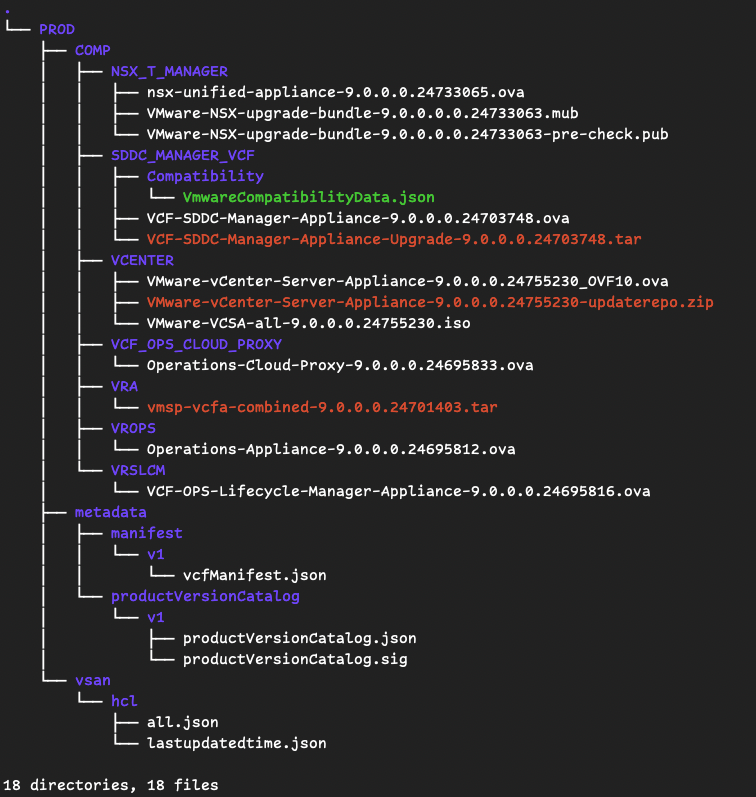
Be aware that it will download all required files for full VCF 9. installation. In my case it requires around 82GB on disk(folder). And my target destination for the downloaded files will be /data folder where is 100GB free space.
Start downloading VCF 9 files.
You need to specify what you want to do (download) , the version, depot download token and destination. Token needs to be in txt for example “downloadtoken.txt”
cd bin
./vcf-download-tool binaries download --vcf-version 9.0.0 --automated-install --depot-download-token-file=/data/downloadtoken.txt --depot-store=/data
Progress / Output
root@workstation:/data/bin# ./vcf-download-tool binaries download --vcf-version 9.0.0 --automated-install --depot-download-token-file=/data/downloadtoken.txt --depot-store=/data
*********Welcome to VMware Cloud Foundation Download Tool***********

Version: 9.0.0.0.24703747
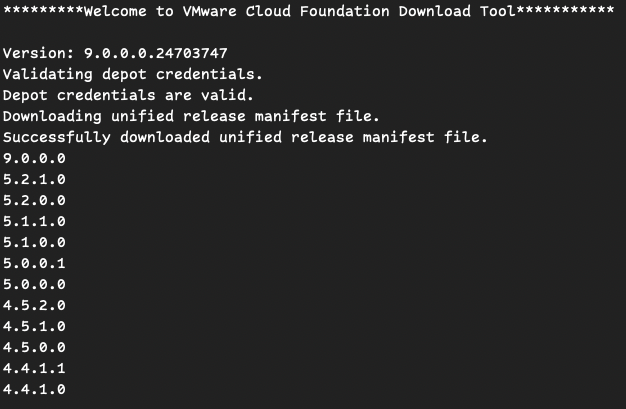
Validating depot credentials.
Depot credentials are valid.
Downloading unified release manifest file.
Successfully downloaded unified release manifest file.
Downloading product version catalog file.
Successfully downloaded product version catalog file.
Downloading vSAN HCL file.
vSAN HCL file is up to date, no download required.
Downloading compatibility data.
Successfully downloaded compatibility data.
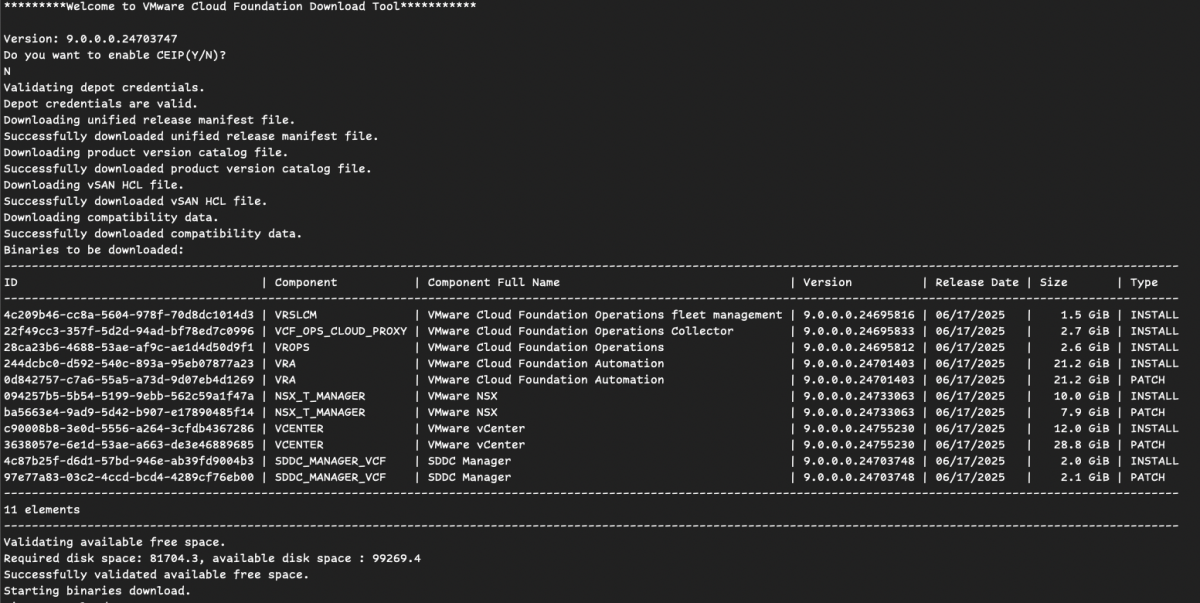
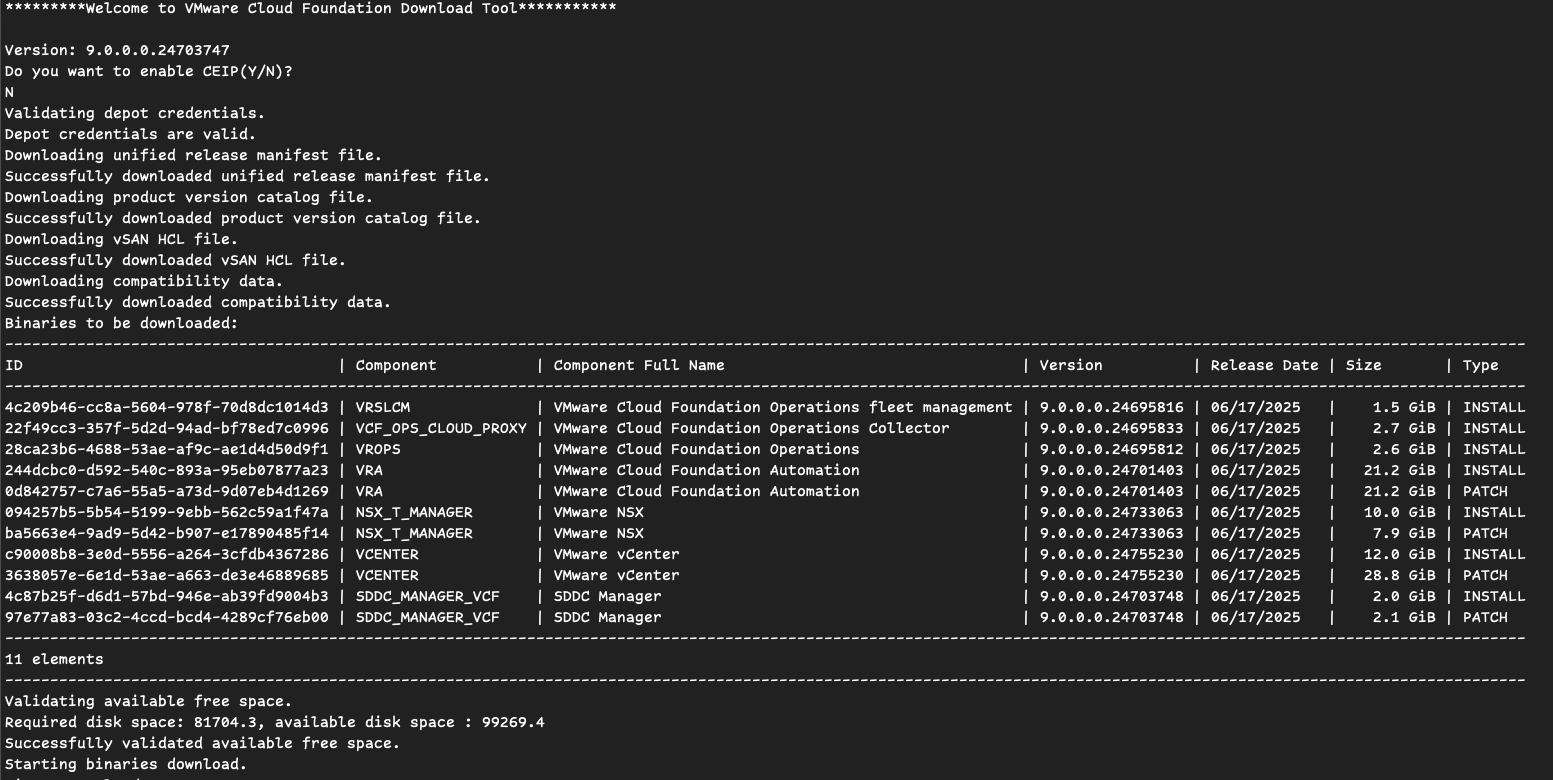
Binaries to be downloaded:
-------------------------------------------------------------------------------------------------------------------------------------------------------------------------
ID                                   | Component           | Component Full Name                                 | Version          | Release Date | Size       | Type
-------------------------------------------------------------------------------------------------------------------------------------------------------------------------
c90008b8-3e0d-5556-a264-3cfdb4367286 | VCENTER             | VMware vCenter                                      | 9.0.0.0.24755230 | 06/17/2025   |   12.0 GiB | INSTALL
3638057e-6e1d-53ae-a663-de3e46889685 | VCENTER             | VMware vCenter                                      | 9.0.0.0.24755230 | 06/17/2025   |   28.8 GiB | PATCH
094257b5-5b54-5199-9ebb-562c59a1f47a | NSX_T_MANAGER       | VMware NSX                                          | 9.0.0.0.24733063 | 06/17/2025   |   10.0 GiB | INSTALL
ba5663e4-9ad9-5d42-b907-e17890485f14 | NSX_T_MANAGER       | VMware NSX                                          | 9.0.0.0.24733063 | 06/17/2025   |    7.9 GiB | PATCH
4c87b25f-d6d1-57bd-946e-ab39fd9004b3 | SDDC_MANAGER_VCF    | SDDC Manager                                        | 9.0.0.0.24703748 | 06/17/2025   |    2.0 GiB | INSTALL
97e77a83-03c2-4ccd-bcd4-4289cf76eb00 | SDDC_MANAGER_VCF    | SDDC Manager                                        | 9.0.0.0.24703748 | 06/17/2025   |    2.1 GiB | PATCH
22f49cc3-357f-5d2d-94ad-bf78ed7c0996 | VCF_OPS_CLOUD_PROXY | VMware Cloud Foundation Operations Collector        | 9.0.0.0.24695833 | 06/17/2025   |    2.7 GiB | INSTALL
244dcbc0-d592-540c-893a-95eb07877a23 | VRA                 | VMware Cloud Foundation Automation                  | 9.0.0.0.24701403 | 06/17/2025   |   21.2 GiB | INSTALL
0d842757-c7a6-55a5-a73d-9d07eb4d1269 | VRA                 | VMware Cloud Foundation Automation                  | 9.0.0.0.24701403 | 06/17/2025   |   21.2 GiB | PATCH
28ca23b6-4688-53ae-af9c-ae1d4d50d9f1 | VROPS               | VMware Cloud Foundation Operations                  | 9.0.0.0.24695812 | 06/17/2025   |    2.6 GiB | INSTALL
4c209b46-cc8a-5604-978f-70d8dc1014d3 | VRSLCM              | VMware Cloud Foundation Operations fleet management | 9.0.0.0.24695816 | 06/17/2025   |    1.5 GiB | INSTALL
-------------------------------------------------------------------------------------------------------------------------------------------------------------------------
11 elements
-------------------------------------------------------------------------------------------------------------------------------------------------------------------------
Validating available free space.
Required disk space: 81704.3, available disk space : 99269.4
Successfully validated available free space.
Starting binaries download.
Download Progress of : VMware-VCSA-all-9.0.0.0.24755230.iso : 0.3 MB, Average Speed: 1.98 Mbps
Download Progress of : nsx-unified-appliance-9.0.0.0.24733065.ova : 0.2 MB, Average Speed: 2.17 Mbps
Download Progress of : VMware-vCenter-Server-Appliance-9.0.0.0.24755230-updaterepo.zip : 0.0 MB, Average Speed: 0.00 Mbps
Download Progress of : VMware-VCSA-all-9.0.0.0.24755230.iso : 27.7 MB, Average Speed: 12.84 Mbps
Download Progress of : nsx-unified-appliance-9.0.0.0.24733065.ova : 20.0 MB, Average Speed: 9.60 Mbps
Download Progress of : VMware-vCenter-Server-Appliance-9.0.0.0.24755230-updaterepo.zip : 21.1 MB, Average Speed: 10.54 Mbps
Download Progress of : VMware-VCSA-all-9.0.0.0.24755230.iso : 86.5 MB, Average Speed: 14.03 Mbps
Download Progress of : nsx-unified-appliance-9.0.0.0.24733065.ova : 79.8 MB, Average Speed: 13.11 Mbps
Download Progress of : VMware-vCenter-Server-Appliance-9.0.0.0.24755230-updaterepo.zip : 81.0 MB, Average Speed: 13.45 Mbps
Download Progress of : VMware-VCSA-all-9.0.0.0.24755230.iso : 211.5 MB, Average Speed: 14.93 Mbps
Download Progress of : nsx-unified-appliance-9.0.0.0.24733065.ova : 211.6 MB, Average Speed: 15.02 Mbps
Download Progress of : VMware-vCenter-Server-Appliance-9.0.0.0.24755230-updaterepo.zip : 210.7 MB, Average Speed: 15.03 Mbps
Download Progress of : VMware-VCSA-all-9.0.0.0.24755230.iso : 471.5 MB, Average Speed: 15.63 Mbps
Download Progress of : nsx-unified-appliance-9.0.0.0.24733065.ova : 473.4 MB, Average Speed: 15.73 Mbps
Download Progress of : VMware-vCenter-Server-Appliance-9.0.0.0.24755230-updaterepo.zip : 470.8 MB, Average Speed: 15.68 Mbps
Download Progress of : VMware-VCSA-all-9.0.0.0.24755230.iso : 998.5 MB, Average Speed: 16.06 Mbps
Download Progress of : nsx-unified-appliance-9.0.0.0.24733065.ova : 1003.5 MB, Average Speed: 16.16 Mbps
Download Progress of : VMware-vCenter-Server-Appliance-9.0.0.0.24755230-updaterepo.zip : 981.7 MB, Average Speed: 15.83 Mbps
Download Progress of : VMware-VCSA-all-9.0.0.0.24755230.iso : 1982.1 MB, Average Speed: 16.22 Mbps
Download Progress of : nsx-unified-appliance-9.0.0.0.24733065.ova : 1991.1 MB, Average Speed: 16.31 Mbps
Download Progress of : VMware-vCenter-Server-Appliance-9.0.0.0.24755230-updaterepo.zip : 1955.9 MB, Average Speed: 16.03 Mbps
Download Progress of : VMware-VCSA-all-9.0.0.0.24755230.iso : 2987.5 MB, Average Speed: 16.40 Mbps
Download Progress of : nsx-unified-appliance-9.0.0.0.24733065.ova : 2996.0 MB, Average Speed: 16.45 Mbps
Download Progress of : VMware-vCenter-Server-Appliance-9.0.0.0.24755230-updaterepo.zip : 2942.7 MB, Average Speed: 16.17 Mbps
Download Progress of : VMware-VCSA-all-9.0.0.0.24755230.iso : 3957.0 MB, Average Speed: 16.34 Mbps
Download Progress of : nsx-unified-appliance-9.0.0.0.24733065.ova : 3980.7 MB, Average Speed: 16.44 Mbps
Download Progress of : VMware-vCenter-Server-Appliance-9.0.0.0.24755230-updaterepo.zip : 3922.6 MB, Average Speed: 16.21 Mbps
Download Progress of : VMware-VCSA-all-9.0.0.0.24755230.iso : 4966.1 MB, Average Speed: 16.43 Mbps
Download Progress of : nsx-unified-appliance-9.0.0.0.24733065.ova : 4996.1 MB, Average Speed: 16.54 Mbps
Download Progress of : VMware-vCenter-Server-Appliance-9.0.0.0.24755230-updaterepo.zip : 4938.3 MB, Average Speed: 16.35 Mbps
Download Progress of : VMware-VCSA-all-9.0.0.0.24755230.iso : 5978.9 MB, Average Speed: 16.51 Mbps
Download Progress of : nsx-unified-appliance-9.0.0.0.24733065.ova : 6023.9 MB, Average Speed: 16.64 Mbps
Download Progress of : VMware-vCenter-Server-Appliance-9.0.0.0.24755230-updaterepo.zip : 5962.4 MB, Average Speed: 16.47 Mbps
Download Progress of : VMware-VCSA-all-9.0.0.0.24755230.iso : 6977.3 MB, Average Speed: 16.53 Mbps
Download Progress of : nsx-unified-appliance-9.0.0.0.24733065.ova : 7017.1 MB, Average Speed: 16.62 Mbps
Download Progress of : VMware-vCenter-Server-Appliance-9.0.0.0.24755230-updaterepo.zip : 6956.7 MB, Average Speed: 16.48 Mbps
Download Progress of : nsx-unified-appliance-9.0.0.0.24733065.ova : 8020.6 MB, Average Speed: 16.64 Mbps
Download Progress of : VMware-VCSA-all-9.0.0.0.24755230.iso : 7974.7 MB, Average Speed: 16.54 Mbps
Download Progress of : VMware-vCenter-Server-Appliance-9.0.0.0.24755230-updaterepo.zip : 7892.1 MB, Average Speed: 16.37 Mbps
Download Progress of : VMware-VCSA-all-9.0.0.0.24755230.iso : 8548.4 MB, Average Speed: 64273.71 Mbps
Download Progress of : VMware-VCSA-all-9.0.0.0.24755230.iso : 8582.8 MB, Average Speed: 4014.38 Mbps
Download Progress of : VMware-VCSA-all-9.0.0.0.24755230.iso : 8653.6 MB, Average Speed: 1409.61 Mbps
Download Progress of : VMware-VCSA-all-9.0.0.0.24755230.iso : 8791.1 MB, Average Speed: 621.19 Mbps
Download Progress of : VMware-VCSA-all-9.0.0.0.24755230.iso : 8949.4 MB, Average Speed: 16.50 Mbps
Download Progress of : nsx-unified-appliance-9.0.0.0.24733065.ova : 8994.9 MB, Average Speed: 16.59 Mbps
Download Progress of : VMware-VCSA-all-9.0.0.0.24755230.iso : 9062.2 MB, Average Speed: 300.37 Mbps
Download Progress of : VMware-VCSA-all-9.0.0.0.24755230.iso : 9589.9 MB, Average Speed: 154.25 Mbps
Download Progress of : VMware-VCSA-all-9.0.0.0.24755230.iso : 9913.6 MB, Average Speed: 16.46 Mbps
Download Progress of : nsx-unified-appliance-9.0.0.0.24733065.ova : 9976.1 MB, Average Speed: 16.57 Mbps
Download Progress of : VMware-VCSA-all-9.0.0.0.24755230.iso : 10593.2 MB, Average Speed: 86.70 Mbps
Download Progress of : VMware-VCSA-all-9.0.0.0.24755230.iso : 11003.1 MB, Average Speed: 16.61 Mbps
Download Progress of : VMware-VCSA-all-9.0.0.0.24755230.iso : 11747.6 MB, Average Speed: 64.48 Mbps
Download Progress of : VMware-VCSA-all-9.0.0.0.24755230.iso : 12140.7 MB, Average Speed: 16.81 Mbps
Download Progress of : VMware-vCenter-Server-Appliance-9.0.0.0.24755230_OVF10.ova : 0.0 MB, Average Speed: 0.00 Mbps
Download Progress of : VMware-vCenter-Server-Appliance-9.0.0.0.24755230_OVF10.ova : 82.8 MB, Average Speed: 41.13 Mbps
Download Progress of : VMware-vCenter-Server-Appliance-9.0.0.0.24755230_OVF10.ova : 298.1 MB, Average Speed: 49.56 Mbps
Download Progress of : VMware-vCenter-Server-Appliance-9.0.0.0.24755230_OVF10.ova : 724.8 MB, Average Speed: 51.67 Mbps
Download Progress of : VMware-vCenter-Server-Appliance-9.0.0.0.24755230_OVF10.ova : 1540.8 MB, Average Speed: 51.30 Mbps
Download Progress of : VMware-vCenter-Server-Appliance-9.0.0.0.24755230_OVF10.ova : 3238.1 MB, Average Speed: 52.19 Mbps
Download Progress of : VMware-NSX-upgrade-bundle-9.0.0.0.0.24733063.mub : 0.5 MB, Average Speed: 2.20 Mbps
Download Progress of : VMware-NSX-upgrade-bundle-9.0.0.0.0.24733063.mub : 59.3 MB, Average Speed: 26.44 Mbps
Download Progress of : VMware-NSX-upgrade-bundle-9.0.0.0.0.24733063.mub : 189.8 MB, Average Speed: 30.37 Mbps
Download Progress of : VMware-NSX-upgrade-bundle-9.0.0.0.0.24733063.mub : 412.6 MB, Average Speed: 28.93 Mbps
Download Progress of : VMware-NSX-upgrade-bundle-9.0.0.0.0.24733063.mub : 665.8 MB, Average Speed: 22.00 Mbps
Download Progress of : VMware-vCenter-Server-Appliance-9.0.0.0.24755230_OVF10.ova : 4566.0 MB, Average Speed: 37.41 Mbps
Download Progress of : VMware-NSX-upgrade-bundle-9.0.0.0.0.24733063.mub : 1208.5 MB, Average Speed: 19.41 Mbps
Download Progress of : VMware-vCenter-Server-Appliance-9.0.0.0.24755230_OVF10.ova : 5609.7 MB, Average Speed: 30.81 Mbps
Download Progress of : VMware-NSX-upgrade-bundle-9.0.0.0.0.24733063.mub : 2268.2 MB, Average Speed: 18.55 Mbps
Download Progress of : VCF-SDDC-Manager-Appliance-9.0.0.0.24703748.ova : 0.1 MB, Average Speed: 1.45 Mbps
Download Progress of : VCF-SDDC-Manager-Appliance-9.0.0.0.24703748.ova : 30.9 MB, Average Speed: 14.61 Mbps
Download Progress of : VCF-SDDC-Manager-Appliance-9.0.0.0.24703748.ova : 105.7 MB, Average Speed: 17.26 Mbps
Download Progress of : VMware-vCenter-Server-Appliance-9.0.0.0.24755230_OVF10.ova : 6677.8 MB, Average Speed: 27.59 Mbps
Download Progress of : VCF-SDDC-Manager-Appliance-9.0.0.0.24703748.ova : 255.4 MB, Average Speed: 18.08 Mbps
Download Progress of : VMware-NSX-upgrade-bundle-9.0.0.0.0.24733063.mub : 3355.3 MB, Average Speed: 18.41 Mbps
Download Progress of : VCF-SDDC-Manager-Appliance-9.0.0.0.24703748.ova : 571.2 MB, Average Speed: 18.96 Mbps
Download Progress of : VCF-SDDC-Manager-Appliance-9.0.0.0.24703748.ova : 1161.7 MB, Average Speed: 18.70 Mbps
Download Progress of : VMware-vCenter-Server-Appliance-9.0.0.0.24755230_OVF10.ova : 7861.2 MB, Average Speed: 26.02 Mbps
Download Progress of : VMware-NSX-upgrade-bundle-9.0.0.0.0.24733063.mub : 4574.6 MB, Average Speed: 18.88 Mbps
Download Progress of : VMware-NSX-upgrade-bundle-9.0.0.0.0.24733063.mub : 6247.1 MB, Average Speed: 20.67 Mbps
Download Progress of bundle tar : VCF-SDDC-Manager-Appliance-Upgrade-9.0.0.0.24703748.tar : 0.2 MB, Average Speed: 2.41 Mbps, Total Size:  : 2133.4 MB
Download Progress of bundle tar : VCF-SDDC-Manager-Appliance-Upgrade-9.0.0.0.24703748.tar : 47.2 MB, Average Speed: 22.24 Mbps, Total Size:  : 2133.4 MB
Download Progress of bundle tar : VCF-SDDC-Manager-Appliance-Upgrade-9.0.0.0.24703748.tar : 162.6 MB, Average Speed: 26.54 Mbps, Total Size:  : 2133.4 MB
Download Progress of bundle tar : VCF-SDDC-Manager-Appliance-Upgrade-9.0.0.0.24703748.tar : 403.2 MB, Average Speed: 28.52 Mbps, Total Size:  : 2133.4 MB
Download Progress of : VMware-NSX-upgrade-bundle-9.0.0.0.0.24733063-pre-check.pub : 0.4 MB, Average Speed: 1.80 Mbps
Download Progress of : VMware-NSX-upgrade-bundle-9.0.0.0.0.24733063-pre-check.pub : 30.7 MB, Average Speed: 13.71 Mbps
Download Progress of : VMware-NSX-upgrade-bundle-9.0.0.0.0.24733063-pre-check.pub : 102.6 MB, Average Speed: 16.41 Mbps
Download Progress of bundle tar : VCF-SDDC-Manager-Appliance-Upgrade-9.0.0.0.24703748.tar : 689.3 MB, Average Speed: 22.86 Mbps, Total Size:  : 2133.4 MB
Download Progress of : VMware-NSX-upgrade-bundle-9.0.0.0.0.24733063-pre-check.pub : 243.1 MB, Average Speed: 17.05 Mbps
Download Progress of : VMware-NSX-upgrade-bundle-9.0.0.0.0.24733063-pre-check.pub : 541.2 MB, Average Speed: 17.88 Mbps
Download Progress of bundle tar : VCF-SDDC-Manager-Appliance-Upgrade-9.0.0.0.24703748.tar : 1297.9 MB, Average Speed: 20.88 Mbps, Total Size:  : 2133.4 MB
Download Progress of : Operations-Cloud-Proxy-9.0.0.0.24695833.ova : 5.9 MB, Average Speed: 32.48 Mbps
Download Progress of : Operations-Cloud-Proxy-9.0.0.0.24695833.ova : 92.5 MB, Average Speed: 42.14 Mbps
Download Progress of : Operations-Cloud-Proxy-9.0.0.0.24695833.ova : 285.7 MB, Average Speed: 46.02 Mbps
Download Progress of : Operations-Cloud-Proxy-9.0.0.0.24695833.ova : 641.9 MB, Average Speed: 45.18 Mbps
Download Progress of : Operations-Cloud-Proxy-9.0.0.0.24695833.ova : 1418.0 MB, Average Speed: 46.94 Mbps
Download Progress of bundle tar : vmsp-vcfa-combined-9.0.0.0.24701403.tar : 0.0 MB, Average Speed: 9.50 Mbps, Total Size:  : 21678.1 MB
Download Progress of bundle tar : vmsp-vcfa-combined-9.0.0.0.24701403.tar : 22.0 MB, Average Speed: 10.98 Mbps, Total Size:  : 21678.1 MB
Download Progress of bundle tar : vmsp-vcfa-combined-9.0.0.0.24701403.tar : 117.0 MB, Average Speed: 19.48 Mbps, Total Size:  : 21678.1 MB
Download Progress of bundle tar : vmsp-vcfa-combined-9.0.0.0.24701403.tar : 345.9 MB, Average Speed: 411.78 Mbps, Total Size:  : 21678.1 MB
Download Progress of bundle tar : vmsp-vcfa-combined-9.0.0.0.24701403.tar : 411.2 MB, Average Speed: 144.39 Mbps, Total Size:  : 21678.1 MB
Download Progress of bundle tar : vmsp-vcfa-combined-9.0.0.0.24701403.tar : 452.1 MB, Average Speed: 32.28 Mbps, Total Size:  : 21678.1 MB
Download Progress of bundle tar : vmsp-vcfa-combined-9.0.0.0.24701403.tar : 545.4 MB, Average Speed: 79.62 Mbps, Total Size:  : 21678.1 MB
Download Progress of bundle tar : vmsp-vcfa-combined-9.0.0.0.24701403.tar : 808.5 MB, Average Speed: 54.42 Mbps, Total Size:  : 21678.1 MB
Download Progress of bundle tar : vmsp-vcfa-combined-9.0.0.0.24701403.tar : 964.9 MB, Average Speed: 32.16 Mbps, Total Size:  : 21678.1 MB
Download Progress of bundle tar : vmsp-vcfa-combined-9.0.0.0.24701403.tar : 1285.6 MB, Average Speed: 41.66 Mbps, Total Size:  : 21678.1 MB
Download Progress of bundle tar : vmsp-vcfa-combined-9.0.0.0.24701403.tar : 1960.3 MB, Average Speed: 31.61 Mbps, Total Size:  : 21678.1 MB
Download Progress of bundle tar : vmsp-vcfa-combined-9.0.0.0.24701403.tar : 2316.7 MB, Average Speed: 36.85 Mbps, Total Size:  : 21678.1 MB
Download Progress of bundle tar : vmsp-vcfa-combined-9.0.0.0.24701403.tar : 3869.8 MB, Average Speed: 31.71 Mbps, Total Size:  : 21678.1 MB
Download Progress of bundle tar : vmsp-vcfa-combined-9.0.0.0.24701403.tar : 4218.5 MB, Average Speed: 34.33 Mbps, Total Size:  : 21678.1 MB
Download Progress of : Operations-Appliance-9.0.0.0.24695812.ova : 0.0 MB, Average Speed: 0.00 Mbps
Download Progress of : Operations-Appliance-9.0.0.0.24695812.ova : 33.2 MB, Average Speed: 16.33 Mbps
Download Progress of : Operations-Appliance-9.0.0.0.24695812.ova : 116.0 MB, Average Speed: 19.21 Mbps
Download Progress of : Operations-Appliance-9.0.0.0.24695812.ova : 277.3 MB, Average Speed: 19.74 Mbps
Download Progress of bundle tar : vmsp-vcfa-combined-9.0.0.0.24701403.tar : 5557.4 MB, Average Speed: 30.52 Mbps, Total Size:  : 21678.1 MB
Download Progress of bundle tar : vmsp-vcfa-combined-9.0.0.0.24701403.tar : 5776.2 MB, Average Speed: 31.59 Mbps, Total Size:  : 21678.1 MB
Download Progress of : Operations-Appliance-9.0.0.0.24695812.ova : 592.8 MB, Average Speed: 19.73 Mbps
Download Progress of : Operations-Appliance-9.0.0.0.24695812.ova : 1239.9 MB, Average Speed: 19.98 Mbps
Download Progress of bundle tar : vmsp-vcfa-combined-9.0.0.0.24701403.tar : 6776.9 MB, Average Speed: 28.00 Mbps, Total Size:  : 21678.1 MB
Download Progress of bundle tar : vmsp-vcfa-combined-9.0.0.0.24701403.tar : 6990.6 MB, Average Speed: 28.78 Mbps, Total Size:  : 21678.1 MB
Download Progress of : Operations-Appliance-9.0.0.0.24695812.ova : 2406.9 MB, Average Speed: 19.72 Mbps
Download Progress of bundle tar : vmsp-vcfa-combined-9.0.0.0.24701403.tar : 7961.3 MB, Average Speed: 26.36 Mbps, Total Size:  : 21678.1 MB
Download Progress of bundle tar : vmsp-vcfa-combined-9.0.0.0.24701403.tar : 8296.8 MB, Average Speed: 27.39 Mbps, Total Size:  : 21678.1 MB
Download Progress of : VCF-OPS-Lifecycle-Manager-Appliance-9.0.0.0.24695816.ova : 3.1 MB, Average Speed: 19.28 Mbps
Download Progress of : VCF-OPS-Lifecycle-Manager-Appliance-9.0.0.0.24695816.ova : 38.7 MB, Average Speed: 17.84 Mbps
Download Progress of : VCF-OPS-Lifecycle-Manager-Appliance-9.0.0.0.24695816.ova : 107.6 MB, Average Speed: 17.40 Mbps
Download Progress of : VCF-OPS-Lifecycle-Manager-Appliance-9.0.0.0.24695816.ova : 265.6 MB, Average Speed: 18.71 Mbps
Download Progress of : VCF-OPS-Lifecycle-Manager-Appliance-9.0.0.0.24695816.ova : 568.0 MB, Average Speed: 18.81 Mbps
Download Progress of bundle tar : vmsp-vcfa-combined-9.0.0.0.24701403.tar : 9516.1 MB, Average Speed: 26.28 Mbps, Total Size:  : 21678.1 MB
Download Progress of bundle tar : vmsp-vcfa-combined-9.0.0.0.24701403.tar : 9717.6 MB, Average Speed: 26.78 Mbps, Total Size:  : 21678.1 MB
Download Progress of : VCF-OPS-Lifecycle-Manager-Appliance-9.0.0.0.24695816.ova : 1180.9 MB, Average Speed: 18.98 Mbps
Download Progress of bundle tar : vmsp-vcfa-combined-9.0.0.0.24701403.tar : 10804.5 MB, Average Speed: 25.60 Mbps, Total Size:  : 21678.1 MB
Download Progress of bundle tar : vmsp-vcfa-combined-9.0.0.0.24701403.tar : 11118.5 MB, Average Speed: 26.29 Mbps, Total Size:  : 21678.1 MB
Download Progress of bundle tar : vmsp-vcfa-combined-9.0.0.0.24701403.tar : 12676.2 MB, Average Speed: 26.29 Mbps, Total Size:  : 21678.1 MB
Download Progress of bundle tar : vmsp-vcfa-combined-9.0.0.0.24701403.tar : 12980.3 MB, Average Speed: 26.88 Mbps, Total Size:  : 21678.1 MB
Download Progress of bundle tar : vmsp-vcfa-combined-9.0.0.0.24701403.tar : 14540.9 MB, Average Speed: 26.82 Mbps, Total Size:  : 21678.1 MB
Download Progress of bundle tar : vmsp-vcfa-combined-9.0.0.0.24701403.tar : 14824.0 MB, Average Speed: 27.31 Mbps, Total Size:  : 21678.1 MB
Download Progress of bundle tar : vmsp-vcfa-combined-9.0.0.0.24701403.tar : 16408.7 MB, Average Speed: 27.25 Mbps, Total Size:  : 21678.1 MB
Download Progress of bundle tar : vmsp-vcfa-combined-9.0.0.0.24701403.tar : 16680.1 MB, Average Speed: 27.67 Mbps, Total Size:  : 21678.1 MB
Download Progress of bundle tar : vmsp-vcfa-combined-9.0.0.0.24701403.tar : 18274.9 MB, Average Speed: 27.60 Mbps, Total Size:  : 21678.1 MB
Download Progress of bundle tar : vmsp-vcfa-combined-9.0.0.0.24701403.tar : 18571.9 MB, Average Speed: 28.02 Mbps, Total Size:  : 21678.1 MB
Download Progress of bundle tar : vmsp-vcfa-combined-9.0.0.0.24701403.tar : 20149.9 MB, Average Speed: 27.90 Mbps, Total Size:  : 21678.1 MB
Download Progress of bundle tar : vmsp-vcfa-combined-9.0.0.0.24701403.tar : 20452.6 MB, Average Speed: 28.29 Mbps, Total Size:  : 21678.1 MB
Binary Download Summary:
-------------------------------------------------------------------------------------------------------------------
Component           | Component Full Name                                 | Version          | Image Type | Status
-------------------------------------------------------------------------------------------------------------------
NSX_T_MANAGER       | VMware NSX                                          | 9.0.0.0.24733063 | INSTALL    | SUCCESS
VCENTER             | VMware vCenter                                      | 9.0.0.0.24755230 | INSTALL    | SUCCESS
SDDC_MANAGER_VCF    | SDDC Manager                                        | 9.0.0.0.24703748 | INSTALL    | SUCCESS
SDDC_MANAGER_VCF    | SDDC Manager                                        | 9.0.0.0.24703748 | PATCH      | SUCCESS
NSX_T_MANAGER       | VMware NSX                                          | 9.0.0.0.24733063 | PATCH      | SUCCESS
VCF_OPS_CLOUD_PROXY | VMware Cloud Foundation Operations Collector        | 9.0.0.0.24695833 | INSTALL    | SUCCESS
VCENTER             | VMware vCenter                                      | 9.0.0.0.24755230 | PATCH      | SUCCESS
VROPS               | VMware Cloud Foundation Operations                  | 9.0.0.0.24695812 | INSTALL    | SUCCESS
VRSLCM              | VMware Cloud Foundation Operations fleet management | 9.0.0.0.24695816 | INSTALL    | SUCCESS
VRA                 | VMware Cloud Foundation Automation                  | 9.0.0.0.24701403 | INSTALL    | SUCCESS
VRA                 | VMware Cloud Foundation Automation                  | 9.0.0.0.24701403 | PATCH      | SUCCESS
-------------------------------------------------------------------------------------------------------------------
11 SUCCESS | 0 FAILED | 0 ALREADY_DOWNLOADED
-------------------------------------------------------------------------------------------------------------------
Successfully downloaded 11 binaries.

Log file: /data/log/vdt.log
At the end you should see “11 SUCCESS | 0 FAILED | 0 ALREADY_DOWNLOADED“.
And now you have all your downloded files in one place (/data).
2) Download all VCF 9 installation files
to download all the VCF related files you will need much more space. Currently it’s required 134GB available space. Otherwise you will receive this error
Validating available free space.
Required disk space: 133797.2, available disk space : 100316.1
ERROR:
Available disk space on user specified directory: /data2 is 100316.1 MB, Required disk space to download bundles 133797.2 MB.
So I added another 200GB disk and mounted it under /data2 folder.
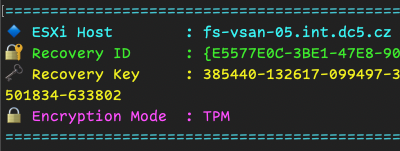
Managing encryption across multiple ESXi hosts can be a bit of a hassle. But don’t worry. I’ve got a simple PowerCLI script that’ll save you time and headaches by quickly retrieving encryption status and recovery keys from your VMware environment.
Why Do You Need This?
Ensuring your ESXi hosts are correctly encrypted is essential for security. Regular checks help prevent surprises later, especially during troubleshooting or audits.
Getting Started
First, make sure you’re connected to your vCenter:
Connect-VIServer -Server
Replace with your vCenter IP or FQDN.
The Script Breakdown
Here’s a quick rundown of the PowerCLI script to verify encryption settings across all ESXi hosts and who Recovery key for each ESXi host. (link to GitHub repository and file tpm_recovery_key_backup.ps1):